We were able to play around with a T-Mobile G1 test device in the office and were intrigued by all of the sensors that were available. The GPS and clock allowed us to generate maps for the exact time and location, but the compass and accelerometer were what made Sky Map truly interesting. Using these two sensors, the app can determine the exact direction that your phone is facing and display the stars that are visible. If you want to identify that bright star in the west, all you have to do is point the device in that direction and you’ll see "Venus" appear on your screen.
Remember the movie "Planet of the Apes?" Of course you do. Actor Charlton Heston’s zinger one-liner "Get your stinking paws off her you damn dirty ape" can be used as an alarm to ward off an iPhone thief. Or use PhoneSCREAM instead.
That and other preventive measures were published by iSmashPhone the other day and is worth a look:
1. Turn On Passcode Lock
Sure, this is an amateur tip – but let’s face the facts. Most people out there do not implement a passcode lock on their iPhones. And they should. While it won’t prevent anyone from snatching your phone, it’ll keep your private information private. Here’s how you do it.
1. Go to "Settings".
2. Go to "General".
3. Go to "Passcode".
4. Enter a 4 digit password.
5. Remember it.
2. Auto-Lock
Your iPhone has an auto-lock option, which (obviously) automatically locks your phone after a chosen period of time, and requires the previously mentioned 4 digit passcode to unlock it. It would be best to have the auto-lock set on either one or two minutes to ensure that the amount of time your iphone spends unlocked is minimized.
3. Record Your iPhone’s IMEI Number and Serial Number
Your iPhone’s International Mobile Equipment Identity (IMEI) number is a fifteen digit number used by wireless carriers to identify your phone. You can find it on the back of your iPhone along with your serial number and FCC ID. Both are important to have when reporting a lost or stolen device.
4. SIM PIN
You can assign a PIN (personal identification number) to your SIM (subscriber identity module) card, so it can’t be used in other phones without the PIN. It must be entered only when you turn the iPhone on, or replace the SIM card.
1. Go to "Settings".
2. Go to "Phone".
3. Turn on "SIM PIN".
4. You are prompted to enter the current PIN, at which point you must enter the default PIN number. If you are an AT&T customer in the US, the code is "1111". Go here for a list of international default SIM PINS.
5. After entering the default, you can change the code and make it whatever secret combination your heart desires.
5. Frequently Back Up Your iPhone
Backing up your device is crucial in all situations. Whether you lose your phone, are the victim of a theft, or simply have a buggy iPhone that decides to crash one day, backing up your iPhone is a simple, necessary step to insure the safety of your data.
This application is brilliant in its simplicity. It dupes the burglar into inadvertently sending you his precise location. Here’s how it works.
Download the application.
Go to "Settings" on your iPhone, and go to "GadgetTrak". Choose a browser homepage. (The default is Yahoo.)
Enter your iPhone’s serial number.
Open the application and register for free with your email and password.
Go to http://www.gadgettrak.com/ and log in to activate tracking.
When you open the application, it opens your homepage just like Safari, but the magic happens in the background. It sends out the location of your iPhone, along with GPS coordinates, maps, IP address, carrier, and ISP data.
Notice the near identical resemblence between the "GadgetTrak" homepage icon and the "Safari" homepage icon.
The Safari icon is typically on the bottom panel on most iPhones. Swap GadgetTrak in place of Safari.
When an unsuspecting iPhone burglar decides to browse the web on your dearly missed gadget, he will unknowingly give away his location – and you’ll get your iPhone back safe. (You should probably have the police come with you.)
Private-I works with 3G iPhones in sending the location of a stolen phone to you. Many others, too.
First off you want to password protect your phone, it’s a hassle, but something that is often overlooked and a first, simple security solution you can activate to make your phone safer. That way anytime you turn your phone on for use, it will require a password entry, this way if you lose your cell phone the data is still password protected from anybody that might try to look into your information.
Secondly, if your phone has Wi-Fi capabilities, never transmit any personal data over public Wi-Fi connections. This means you don’t want to conduct a whole lot of personal business using a coffee house’s internet connection, because being a public connection it’s not safe for personal data. Anybody could easily intercept your signal and steal any information you receive or send over a public Wi-Fi network, so you should limit your use not to include anything vital, like a credit card number or information about you.
Finally, there is some information you shouldn’t store on your phone, no matter what security precautions you are already taking. Information like bank account numbers, or the PIN number associated with your account is a big don’t. Social Security Numbers, and credit card numbers, also a very bad idea, as that information just isn’t secure enough on your cell phone, even with limiting Wi-Fi usage and password protecting. A smart phone is a great tool, but never forget to respect how easily the information contained within could be stolen and used against you.
The Bass Station is a big 80’s boombox, complete with a router, etc:
The external form of the Bass-Station is a vintage 1980’s boom box. Internally, the tape and radio mechanisms have been removed and replaced with a modern miniature computer. The computer contains a sound output device, a large hard-drive, and a wireless network interface card. All the components that make up the device are standard and readily available around the world.
Going one step deeper, the computer, running a modern operating system (Linux), uses the wireless interface card to create a self-standing yet open wireless network. It functions as an access-point broadcasting its presence in a limited range making the network only accessible by a localized community. The network that is created cannot access external networks nor is it accessible from other networks like the Internet, for example.
A collection of networking services make it easy and simple for users in the presence of the network to join and begin interacting with the content that is there. A DHCP server [1] is used to automatically assign IP addresses to clients trying to join the network. A DNS server [2] is configured in a manner that will redirect users to a central location regardless of the domain that they are requesting (e.g. asking for www.google.com, or any other domain, will always direct a user to the Bass-Station’s domain.) A web server is used to serve people the main interface to the Bass-Station’s functionality. All of these services combined facilitate a person’s interaction with the content and functionality of the Bass-Station. Lastly, there is a program called the Bassment Daemon that manages the audio engine and playing of music from the stereo’s speakers.
The main chip on this board is the PIC18F97J60 which uses integrated MAC and PHY to interface directly to the RJ45 MigJack Ethernet cable connector. Communication over the internet is made easy by having Microchip’s TCP/IP stack programmed on the 97J60 micro controller. The microcontroller’s I/O is used to interface to the OLED graphics LCD display. This display allows for showing the IP address, mode of operation, song and station. Using this phi interface the microcontroller interfaces to the BLFI5BS1011 Mp3 audio decoder. A simple audio head set jack will allow listener to plug into standard head phones or connect to a speaker like this so that multiple people can listen at the same time. The URL website addresses for multiple internet radio stations are preprogrammed on the system. So push buttons will allow the use to scroll through the radio stations and select the desired station. Other push buttons are for volume up and down.
Sounds cool, but where do you start? DIY Drones has a guide for newbies, including this flow chart. Make: has several entries, including this Arduino one.
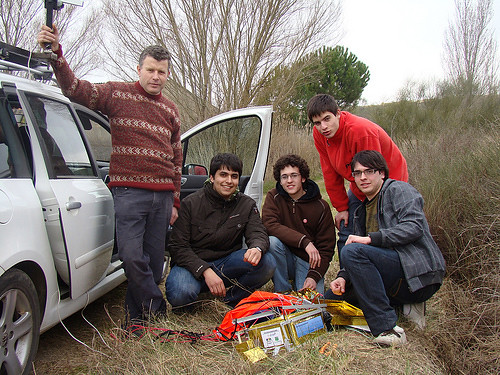
Four students in Spain sent a balloon and camera into the stratosphere and were simply overwhelmed with the results:
Completing their landmark experiment on February, the Meteotek team had to account for a wide variety of variables and rely on a lot of luck.
"The balloon we chose was inflated with helium to just over two metres and weighed just 1500 grams," said Gerard. "It was able to carry the sensor equipment and digital Nikon camera which weighed 1.5kg.
"However, when we launched at 9.10am on that morning the critical point for the experiment was to see if the balloon would make it past 10,000m, or 30,000ft, which is the altitude that commercial airliners fly at."
Due to the changing atmospheric pressures, the helium weather balloon carrying the meteorological equipment was expected to inflate to a maximum of nine and a half metres as it travelled upwards at 270 metres-per-minute.
"We took readings as the balloon rose and mapped its progress using Google Earth and the onboard radio receiver," said Gerard.
"At over 100,000ft the balloon lost its inflation and the equipment was returned to the earth.
"We travelled 10km to find the sensors and photographic card, which was still emitting its signal, even though it had been exposed to the most extreme conditions."
In 1970, Marshall Kaplan, then an aerospace engineering professor at Penn State, had a peculiar dream — he wanted to retrieve Sputnik, the world’s first orbiting satellite, from space.
Sputnik had been launched by the Russians in 1957, and by 1970 it was no longer operational. Kaplan wanted to go get it.
NASA had never considered space retrieval before, but it thought it was a good idea. Kaplan got the job, but it didn’t work out — because the time frame was too short. Sputnik, nearing the end of its life cycle, was already about to deorbit — the technical term for what happens when an object circling the Earth gets close enough to be caught in gravity and burned to cinders in the atmosphere.
But that didn’t mean Kaplan needed a new line of work.
In fact, his work was just beginning.
Have you ever seen the Sputnik launch from 1957? Here’s the footage:
The lunatic is on the grass — and the grass is getting greener every day here in the northeast U.S. It won’t be long before we need to start mowing it. Got that lawnmower tuned-up? In this economy, you better consider doing it yourself.
Seasonal maintenance consists largely of cleaning and lubricating. Dirt on the inside is abrasive, while dirt on the outside traps heat–both increase wear and shorten service life. To avoid these problems, follow this four-step program, further detailed in the diagrams on the following pages.
1. Clean the underside of the deck whenever you see windrows of grass clippings on the lawn. These indicate a clogged deck.
2. Sharpen the blade at least once a year. A dull blade tears the grass instead of cutting it.
3. Install a new spark plug every year. A fouled plug and stale gas are the two leading causes of hard starts.
4. Change the oil and filter, and clean the fuel tank at least once a year.
Looking to save a little money on your lawn care in these tight financial times? The University of Delaware’s Alpha Gamma Rho fraternity for agriculture, the Society of Automotive Engineers Club and the Engineering Technology Club are once again offering a push lawn mower tune-up service on April 17-18, rain or shine.
Since 2000, this annual event has serviced more than 4,000 push mowers.
The tune-up — provided by trained students and alumni members of the clubs — includes an oil change, spark plug replacement, air filter check and cleaning, blade sharpening, and power washing. The cost is $35, the same as it has been for the past four years.
Drop off times are from 2 to 8 p.m. on Friday, April 17, and from 8 a.m. to 6 p.m. on Saturday, April 18.
Customers can pick up their mowers on Saturday from 1 to 6 p.m. for the first 300 mowers taken on Friday, or on Sunday, April 19, from 8 a.m. to 2 p.m., for the remaining mowers. All mowers must be picked up by 2 p.m. on Sunday.
Lawnmowers — push lawnmowers only; no riding mowers — may be dropped off and picked up in the parking lot behind Worrilow and Townsend halls on UD’s College of Agriculture and Natural Resources campus at 531 South College Avenue, across from the Chrysler Plant, just north of the Fred Rust Ice Arena. Look for signs for the tune-up.
Tired of pushing that thing around or riding a boring little tractor for hours? Get a robot, like the $2,200+ Ambrogio L50. Or build one yourself:
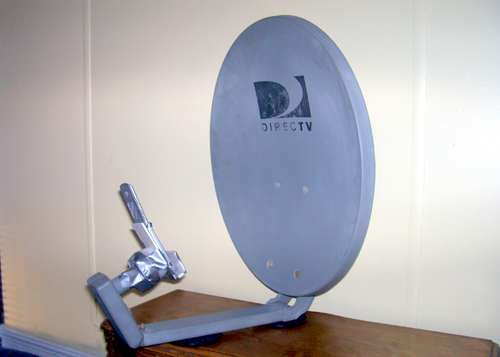
Birdbaths and Spartan shields are OK ideas, but using it to boost cell phone or WiFi signals might be more useful. We’ve got a place up in the mountains and finding a good cell signal can be tricky.
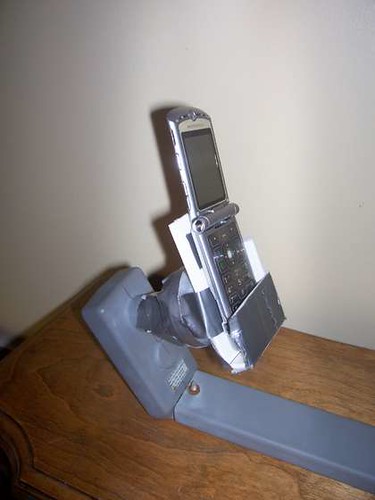
While working in my yard one afternoon I noticed an old satellite TV dish on top of a pole in my backyard. It had been left there by the previous residents. Suddenly a light bulb came on. I grabbed some wrenches, took down the dish and held my cell phone next to the antenna’s horn. I was amazed to find that I instantly got full signal. I could not believe my eyes. I went from no signal to full signal and had not spent a dime or changed anything on my cell phone. Just to make sure I made a call using speaker phone and found that this thing truly did work.
The next test came when I took the assembly inside the house to try it. With aluminum siding on the house I have problems even getting a television signal using a rabbit ear antenna. To my surprise, I got two bars inside so long as I pointed the dish at a double window in my living room. I no longer miss calls and I don’t have to leave home to talk on my cell phone. It isn’t an ideal setup but it works and did not cost me anything. It is also a great way to recycle that old dish antenna that would have ended up in the trash otherwise.
I will try this myself, as I have the two main elements: weak cell signal and an old antenna.
Excellent use of resources: powdered donuts and tea, via Register Hardware:
In a fast-paced video, the presenter runs through a process that essentially combines chemicals from tea and American-style sugared doughnuts to form a solar energy soaking film that can be applied to a sheet of glass.
The process isn’t easy and requires a fair amount of scientific kit, but he starts by extracting “titanium dioxide nanoparticles” from some powdered sugar doughnuts.
Roughly ten layers of these nanoparticles applied to a sheet of glass is, according to the video’s presenter, “pretty much a solar cell”.
But because this set-up on its own won’t work with “regular sunlight", the presenter next extracts organic dyes from a cup of sweet tea that enables the solar cell to “absorb light we can see”.
Finally, to prove that his invention works, the solar scientist hooks the cell up to a multimeter that appears to show an electrical current being generated from the DIY solar cell.